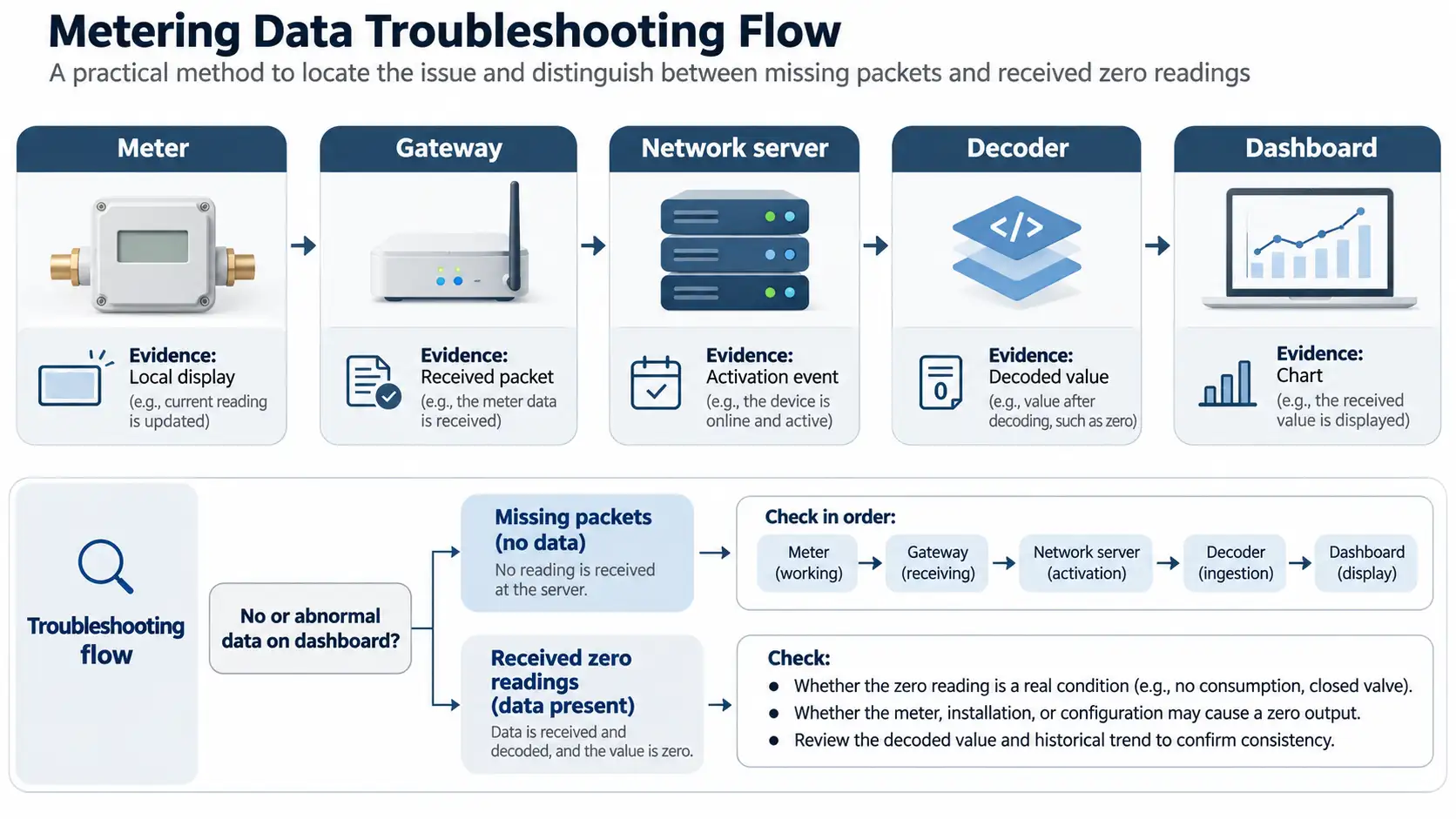


A blank dashboard is where a missing reading becomes visible. Before dispatching someone to the meter, open the server events. A fresh packet there rules out complete radio silence for that event. No packet means the investigation moves back toward the gateway and meter. This is the first useful split when dealing with a LoRaWAN water meter not sending data.
Write down when the readings stopped. Include the last value that arrived, rather than just the time someone noticed the empty chart. A field technician looking at the meter and an engineer looking at the dashboard may otherwise be discussing different reporting cycles without realizing it.

Img.Water meter data path through a gateway and servers to a dashboard.webp
Take a DN15 LoRaWAN water meter as an example. The DN15 marking helps identify the pipe connection, but the radio configuration still needs checking against the order and installed label. Look up its firmware, antenna arrangement and registration in the commissioning record. A mismatch here is worth resolving before any settings are touched.
Be careful with the word LoRa in an equipment description. It names the radio technology, whereas LoRaWAN specifies the networking protocol. With a proprietary collector in the installation, use the supplier’s diagram to follow each connection. There may be no equivalent to the gateway event screen assumed by a generic troubleshooting guide.
How often is this unit supposed to report? Opening a tap may change the local reading without triggering a transmission. Look up the reporting schedule and its permitted delay before calling the silence a fault. Keep a copy of those settings for the end of the test.
Count the affected devices. Ten silent meters sharing a gateway suggest a different visit plan from one silent meter surrounded by working ones. For the group outage, inspect the shared connection before arranging individual property visits. If neighboring devices still report normally, investigate the silent meter and its location, keeping coverage differences in mind.
| Evidence available | Likely investigation area | Next check |
| No fresh packets at the gateway | Meter, radio path, or gateway receiver | Reporting schedule and a working comparison device |
| Gateway receives packets but server does not | Forwarding or backhaul | Gateway connection and server destination |
| Join requests appear but activation fails | Registration or join exchange | Identifiers, credentials, regional settings, and errors |
| Accepted uplinks have no usable readings | Payload interpretation | Firmware, FPort, decoder, and units |
| Decoded readings exist but chart is stale | Application integration | Delivery logs, asset mapping, and timestamps |
Choose the row supported by the newest event, and save that event with the fault report. Its device identifier and timestamp matter, especially when one log uses UTC and another displays local time.

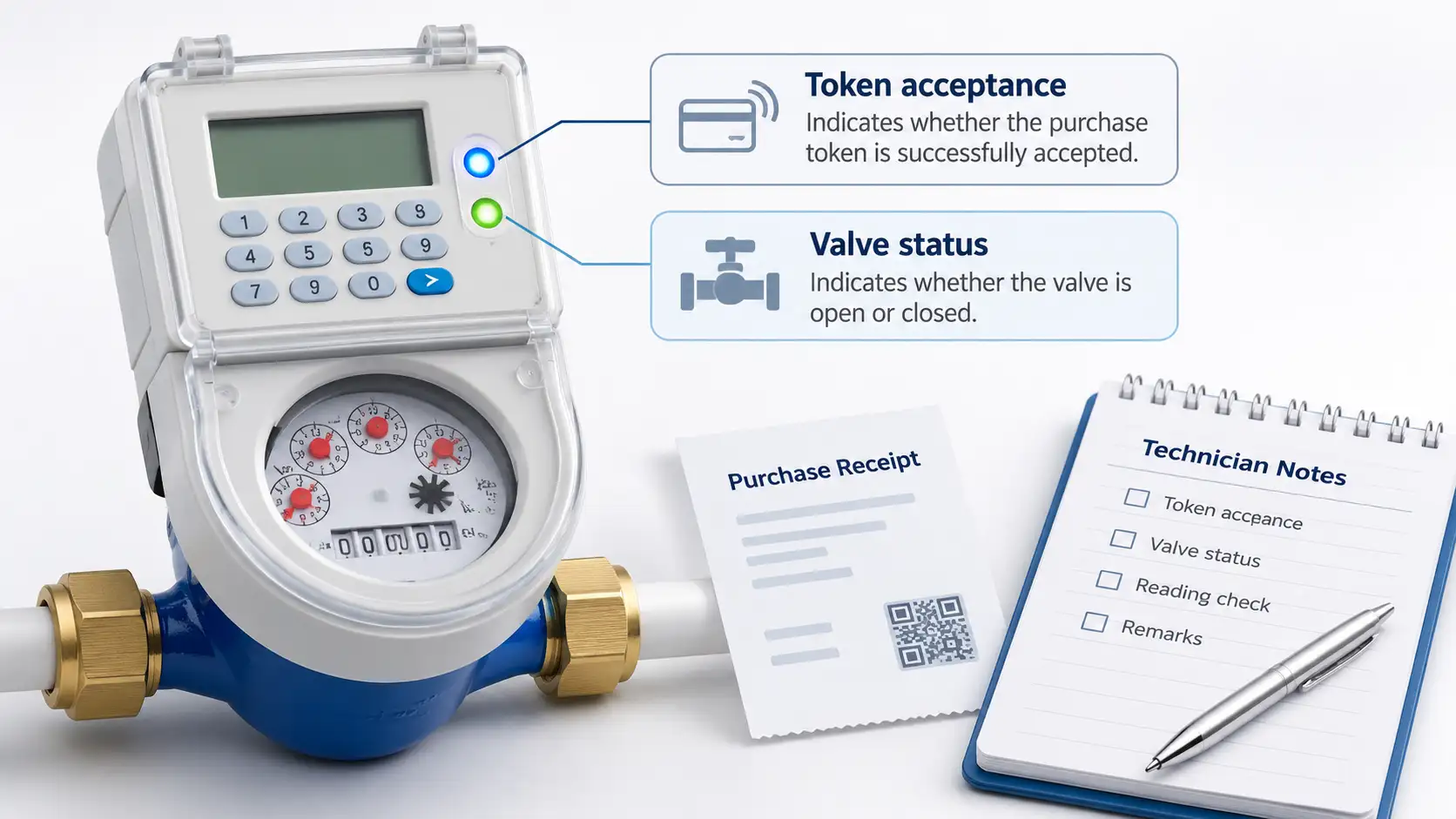
At the site, start with what can be observed without opening the unit. Capture the display and any alarm, then, where a water draw is authorized, watch the cumulative register while water flows. A changing register answers the measurement question. It leaves the radio question open, even if the display looks perfectly normal.
Chenshuo XT815 meters provide battery-voltage monitoring and low-voltage warnings. Their communication options include 4G, LoRa, and LoRaWAN. Match the troubleshooting instructions to the installed option. The XT815 function code 102 followed by Enter is specified for forced uploading on 4G/NB-IoT versions; it should not be treated as a universal LoRaWAN transmission command.
For an XT815-U ultrasonic prepaid water meter, an empty measuring tube can interrupt ultrasonic measurement. A freshly received zero-flow value therefore needs a different investigation from a missing packet. Check the local alarm and pipe condition before blaming the network for an unchanged consumption total.
Coordinate a test with the person watching the server. Otherwise a brief transmission may pass unnoticed while the technician is busy at the meter. Use the model-approved wake-up procedure. If the next step involves a sealed compartment or internal wiring, hand it to qualified service personnel rather than improvising a reset.
Open the actual channel settings instead of stopping at the frequency label. Two devices marked 915 MHz can still be listening and transmitting on incompatible selections. Check the regional plan through all three records: meter, gateway and server, including the sub-band where one is required.
Was the pit open when the meter last communicated successfully? A test beside an open chamber does not reproduce a closed installation. Put the lid material and chamber depth in the site notes, together with the antenna location and obstructions. During an approved positioning trial, leave the other settings alone. That makes an improvement, or lack of one, interpretable.
For Chenshuo XT815 meters, weak signal, communication-module faults, and incorrect parameters can cause missing uploads. Replacing the module before checking its settings and location risks repeating the fault with new hardware. Keep replacement as the next step when those checks leave a credible hardware problem.
A known-working device with compatible settings provides a useful comparison at the site. Record whether both devices fail or only the suspect meter does. An advertised distance cannot settle this question, and one received packet is only a starting point for assessing delivery over time.
For an OTAA device, locate the join request in the logs. Then ask the administrator to compare the registered identifiers with the provisioning record: DevEUI and JoinEUI, sometimes called AppEUI, along with the LoRaWAN version. Key verification happens in the approved credential system. A screenshot for a support ticket should contain none of those secret keys.
Two log patterns lead in different directions. A rejected request calls for the administrator to examine the rejection event. Repeated requests after scheduled join accepts raise a return-path question: did the meter receive the reply within its receive window? Gateway timing and radio conditions then deserve attention.
A device activated by personalization has a different starting point because it does not perform the same join exchange. Check its session configuration with the network administrator. If reporting stopped after a reset, the timing of that change belongs in the fault record. Frame-counter and authentication errors can guide the administrator toward an approved recovery. Leaving security checks disabled would conceal a problem rather than establish a sound production configuration.
A received packet with an empty reading field is already a different problem from radio silence. Open its raw payload and FPort alongside the decoder output. Does that decoder belong to this firmware revision? A change in field sizes, byte order or scaling can leave the radio working while the application produces unusable readings.
Check the decoded value against the local reading taken at a known time. Allow for the reporting delay, and settle which number is being compared: a total or an interval value, in liters or cubic meters. Also follow the device identifier into the asset record. A sensible-looking total attached to the wrong property is still a billing problem.
If decoded data is correct, follow its delivery into the receiving application. Inspect webhook responses or the configured message subscription, authentication, destination, and ingestion errors. Then check dashboard filters and timestamp handling. An integration can receive a message successfully while placing it outside the chart’s selected period.
Restore the approved reporting schedule after testing. Observe enough scheduled cycles to cover the project’s acceptance window, with the enclosure closed and the gateway using its normal backhaul. Record expected reports, received reports, unexplained gaps, and the local-to-platform reading comparison. Decide what counts as recovery before the test window starts.
Save the original failure beside the successful retest. There is still a separate question about the missing history. This configuration may support stored interval retrieval, or it may not. A later cumulative total can help reconcile consumption across a gap without revealing when every part of that consumption occurred.
If the fault remains, request a configuration review from Chenshuo. Send the model and firmware, regional plan, gateway details and redacted logs. Add the last successful reading time and the changes tried so far. That can save another round of basic checks.
No. The display, measurement function, and radio path must be checked separately. Look for a fresh packet and its device identifier in the gateway or server logs.
Save the configuration and fault evidence first. Reset only through the approved procedure because activation state and counters may require coordinated recovery.
The final enclosure can change the radio path. Repeat an approved coverage test in the closed condition and assess antenna or gateway positioning.
A Class A meter opens its downlink receive windows after it transmits. A command waiting at the server may therefore have to wait for the next uplink. Check the device class and schedule first.
That depends on the records the meter retains and what the platform can retrieve. Ask specifically about interval history and retention. Restoring a live connection does not by itself establish that the earlier readings can be recovered.
 Address: Xiao'anzi Industrial Park, Baishabu Town, Lanshan District, Linyi City, Shandong Province
 Call us now:+86 15562945993
 Email:info@sdchenshuo.cn


Shandong Chenshuo Instrument Co., Ltd.